The control room
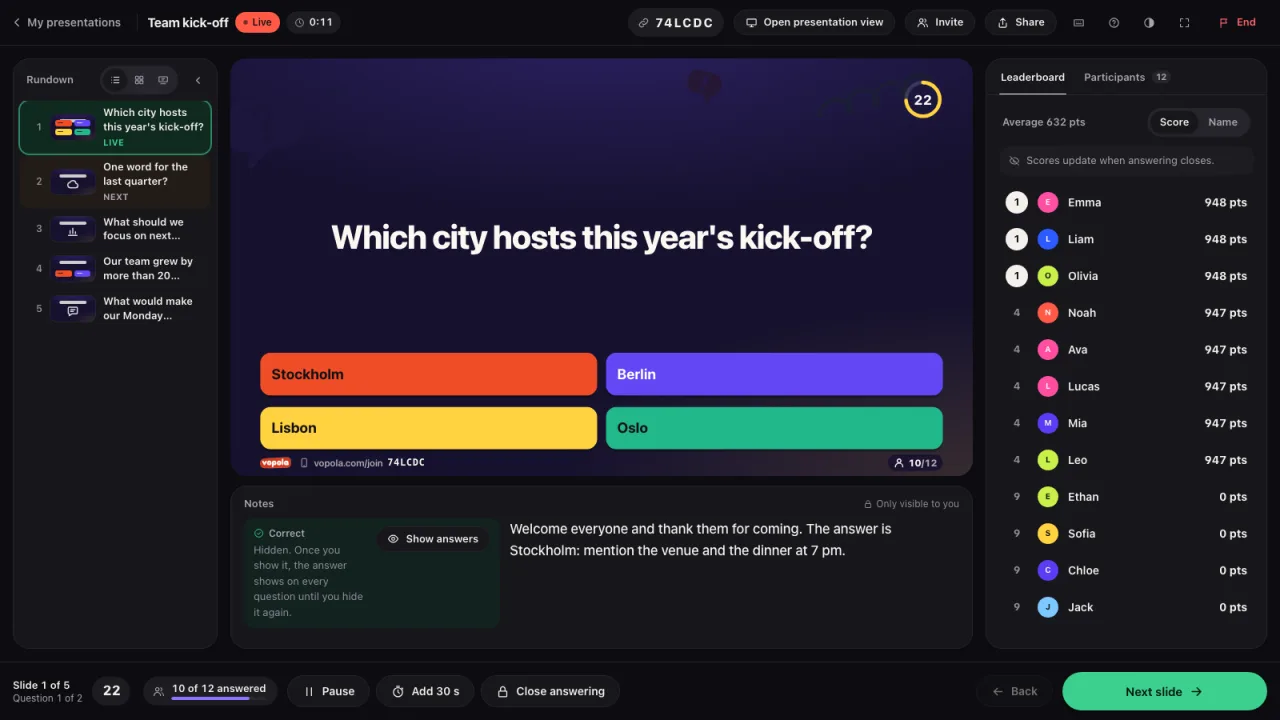
The control room is your screen during the session. Here you see the slide everyone sees, your notes and who has joined. You lead it all slide by slide.
How to
- At the top is everything for the whole session: the code, Open presentation view, Invite, Share and End.
- In the middle is the slide exactly as it appears on the presentation screen.
- On the left is the Rundown with all slides. The one showing now is green.
- Below the slide are your notes and the answers. On the right you see Participants. When needed, you also find Leaderboard and Review there.
- At the bottom, click Next slide to move on or Back to go back.
- On a quiz question you can click Show answers to see the answer key. Only you see it.
- Tip: You can also move on with the space bar or the right arrow. Click the keyboard icon at the top to see all shortcuts.